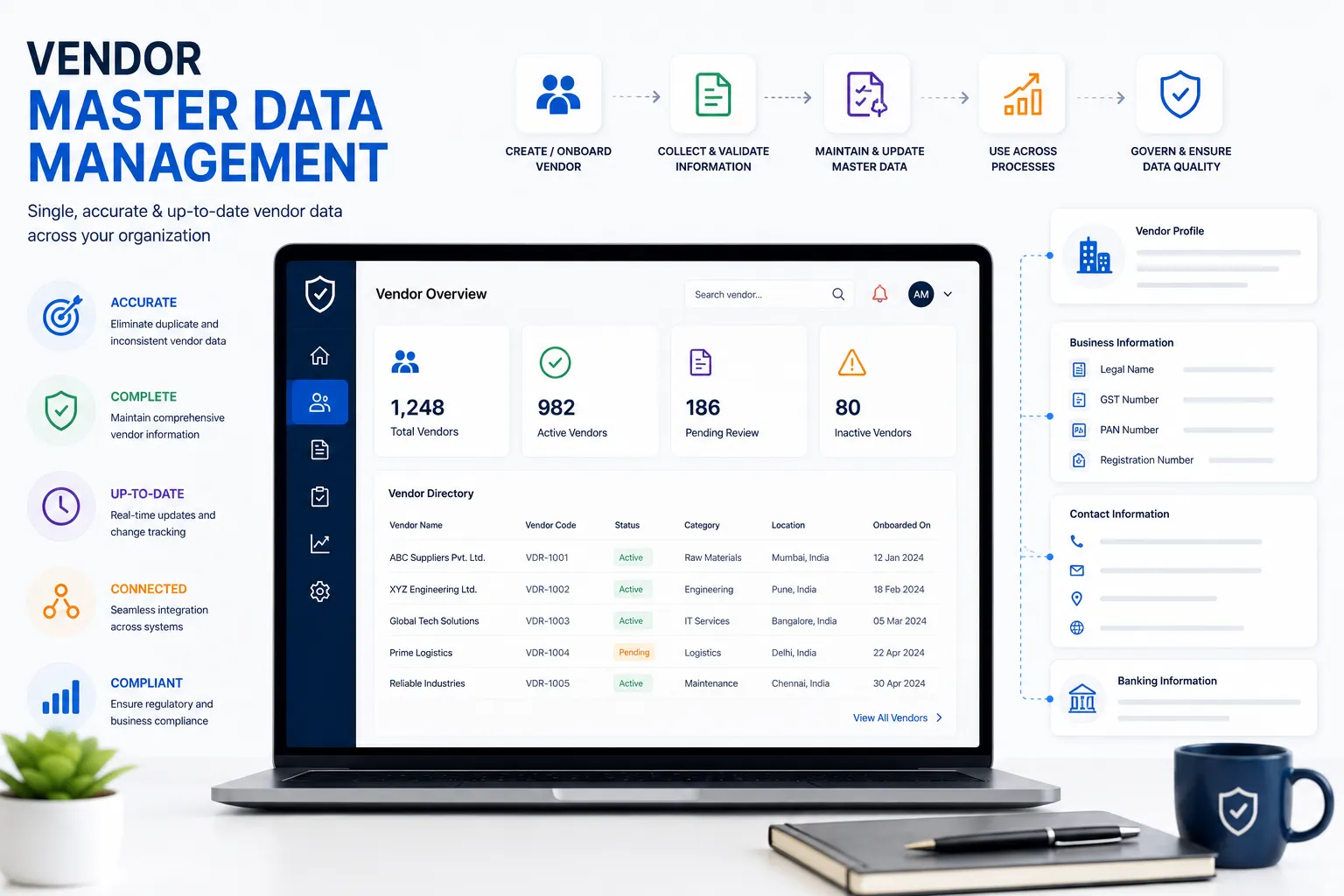
Vendor Master Data Management: Complete Guide, Best Practices & Process
Vendor Master Data Management (Vendor MDM) is the process of creating, validating, maintaining, governing, and updating a trusted source of vendor information throughout the vendor lifecycle.
How confident are you that your procurement team is working with the correct vendor information?
As organizations grow, vendor information often becomes scattered across ERP systems, spreadsheets, emails, procurement applications, shared folders, and paper records.
Duplicate vendor entries, outdated contact information, missing compliance documents, inconsistent payment details, and uncontrolled changes can create unnecessary risks and slow down procurement operations.
For manufacturing companies, logistics providers, warehouses, engineering firms, food processing businesses, and other organizations managing large supplier networks, effective Vendor Master Data Management can improve procurement efficiency, data quality, governance, and compliance visibility.
This guide explains what Vendor MDM is, what information belongs in a vendor master, how the vendor master process works, common problems, best practices, software features, and how Vendor MDM connects with vendor compliance.
What Is Vendor Master Data Management?
Vendor Master Data Management is the structured process of collecting, validating, standardizing, maintaining, and governing vendor information across the organization.
A vendor master provides a single, trusted record for each vendor. It can include information such as:
- Legal business name and registered address
- Tax and registration details
- Contact information
- Banking and payment details
- Products and services
- Compliance documents and certifications
- Risk classification
- Contracts and commercial information
- Vendor status and approval information
The objective is to ensure that vendor information remains accurate, complete, consistent, current, and accessible to the teams that rely on it.
Effective Vendor MDM also establishes rules for who can create or modify vendor records, how information is validated, how duplicate vendors are identified, and how changes are reviewed and tracked.
For procurement, finance, accounts payable, compliance, and risk teams, this creates a reliable vendor record that can support purchasing, payments, reporting, compliance monitoring, and vendor risk management.
Vendor Master Data vs Supplier Master Data
The terms vendor and supplier are often used interchangeably in procurement.
A supplier provides goods or services to an organization, while vendor is commonly used in procurement, finance, and ERP systems for the same business relationship.
As a result, Vendor Master Data Management and Supplier Master Data Management often address similar data-management requirements.
Both may manage:
- Legal supplier or vendor identity
- Tax information
- Addresses
- Contacts
- Banking information
- Categories
- Risk information
- Approval status
- Compliance information
The terminology used by an organization usually depends on its procurement and ERP processes.
For organizations searching for Vendor MDM, Supplier MDM, or Vendor Master Data Management, the core objective is the same:
Maintain accurate, complete, consistent, current, and trusted information about every vendor or supplier.
Why Vendor Master Data Management Matters
Poor vendor data can affect procurement, finance, compliance, operations, and management.
Common problems include:
- Duplicate vendor records
- Incorrect payments
- Missing vendor information
- Outdated contact details
- Incorrect tax information
- Missing compliance documents
- Slow vendor onboarding
- Procurement delays
- Reporting inaccuracies
- Audit challenges
- Uncontrolled changes
- Difficulty assessing vendor risk
A controlled Vendor MDM process helps organizations establish a consistent way to create, validate, approve, update, and deactivate vendor records.
| Without Vendor MDM | With Vendor MDM |
|---|---|
| Duplicate vendors | Controlled vendor records |
| Scattered information | Centralized vendor information |
| Manual updates | Controlled update process |
| Inconsistent data | Standardized data |
| Unclear ownership | Defined data ownership |
| Difficult audits | Better audit traceability |
| Missing documents | Connected vendor documents |
The objective is not simply to store vendor information.
The objective is to maintain trusted vendor data throughout the vendor lifecycle.
Who Can Benefit From Vendor Master Data Management?
Vendor MDM can be useful for organizations that manage multiple vendors or suppliers, particularly when vendor information is shared across departments.
Common industries include:
| Industry | Typical Vendor MDM Need |
|---|---|
| Manufacturing | Suppliers, raw materials, contractors |
| Logistics | Transporters, service providers, contractors |
| Warehousing | Facility, maintenance, and service vendors |
| Food Processing | Ingredient, packaging, and service suppliers |
| Automotive | Component and engineering suppliers |
| Engineering | Project and material suppliers |
| Construction | Contractors and subcontractors |
The need for Vendor MDM generally increases as the number of vendors, users, locations, transactions, and compliance requirements grows.
What Information Should Be Managed in a Vendor Master?
A complete vendor master should contain the information required to identify, transact with, evaluate, and manage a vendor.
Vendor Identity
- Legal company name
- Trade name
- Business type
- Registration information
- Vendor identifier
Tax Information
- GST registration
- PAN
- Other applicable tax identifiers
- Tax classification
Contact Information
- Registered address
- Billing address
- Shipping or operating address
- Primary contact
- Email address
- Phone number
Banking and Payment Information
- Bank name
- Account information
- Payment terms
- Payment method
- Relevant verification information
Vendor Classification
- Vendor category
- Products or services
- Business unit
- Location
- Criticality
- Risk level
Compliance Information
- GST certificate
- PAN document
- MSME certificate
- PF registration
- ESI registration
- Labour license
- Insurance certificates
- Other required statutory or contractual documents
Commercial and Lifecycle Information
- Contract dates
- Approval status
- Vendor status
- Performance information
- Risk classification
- Review dates
The exact fields should be defined according to the organization’s business, industry, regulatory requirements, and procurement process.
The Vendor Master Data Management Process
A practical Vendor MDM process can be organized into these stages:
- Vendor registration
- Vendor information collection
- Data validation
- Duplicate vendor check
- Compliance document collection
- Review and approval
- Vendor activation
- Ongoing updates
- Periodic data review
- Vendor deactivation or archival
Each stage should have clear ownership and rules.
Step 1: Vendor Registration
The process begins when a new vendor needs to be added.
The organization should collect the minimum information required to evaluate and create the vendor record.
Typical information includes:
- Legal name
- Contact information
- Business address
- Tax information
- Bank information
- Vendor category
- Products or services
- Required documents
A standardized registration process reduces incomplete vendor records.
Step 2: Validate Vendor Information
Vendor information should be validated before the vendor is approved.
Validation can include:
- Mandatory field checks
- Format validation
- Tax information validation
- Document validation
- Address checks
- Duplicate checks
- Banking information verification
- Internal approval requirements
Critical information should have appropriate verification procedures.
Step 3: Prevent Duplicate Vendors
Duplicate vendors are one of the most common vendor master data problems.
For example, the following records may represent the same company:
- ABC Engineering Pvt Ltd
- ABC Engineering Private Limited
- ABC Engineering
- A.B.C. Engineering Pvt. Ltd.
Duplicate records can affect:
- Supplier counts
- Spend analysis
- Procurement reports
- Payments
- Risk assessment
- Vendor performance reporting
Potential duplicate checks can use:
- Legal name
- GST number
- PAN
- Tax identification number
- Email domain
- Bank account information
- Registered address
A potential duplicate should be reviewed before creating another vendor record.
Step 4: Collect and Connect Compliance Documents
Vendor master data should work together with vendor compliance information.
Depending on the vendor and industry, required documents may include:
- GST certificate
- PAN card
- MSME certificate
- Insurance certificate
- Labour license
- PF registration
- ESI registration
- Other statutory or contractual documents
The vendor master should indicate which documents are required and the compliance process should track their status and validity.
This is especially important because vendor compliance can change after the vendor has already been approved.
Step 5: Review and Approve the Vendor
New vendors and important vendor changes should follow a controlled approval workflow.
For example:
Vendor Registration
↓
Data Validation
↓
Duplicate Check
↓
Compliance Review
↓
Procurement Review
↓
Management Approval
↓
Vendor Activation
The exact workflow should depend on the organization’s procurement policy and vendor risk level.
Step 6: Activate the Vendor
Once required information, validations, documents, and approvals are complete, the vendor can be activated.
A vendor status model may include:
- Pending
- Under Review
- Approved
- Active
- Suspended
- Blocked
- Inactive
Clear statuses help procurement and finance teams understand the current state of each vendor.
Step 7: Maintain Vendor Data
Vendor master data should not be considered a one-time data-entry activity.
Vendor information can change over time.
For example, a vendor may:
- Change its legal name
- Change its address
- Change its contact person
- Update bank information
- Renew a registration
- Obtain MSME registration
- Change its products or services
- Change ownership
- Change compliance status
Organizations should define who can make changes and how important changes are reviewed and approved.
Step 8: Periodically Review Vendor Data
Regular reviews can help identify:
- Duplicate vendors
- Inactive vendors
- Missing information
- Outdated contacts
- Incorrect classifications
- Invalid records
- Missing compliance information
Review frequency can depend on vendor criticality, risk, and business requirements.
Higher-risk or strategically important vendors may require more frequent reviews.
Step 9: Deactivate or Archive Inactive Vendors
Vendor lifecycle management should also include inactive vendors.
A vendor may become inactive because:
- The contract ended
- The business relationship ended
- The vendor stopped supplying goods or services
- The vendor was replaced
- The vendor no longer meets requirements
Inactive vendors should be handled according to the organization’s retention, finance, audit, and compliance policies.
Deactivation helps prevent inactive vendors from being accidentally used for new transactions.
Vendor Master Data Quality
Good Vendor MDM depends on good data quality.
Five useful dimensions are:
Accuracy
Is the vendor information correct?
Completeness
Are all required fields populated?
Consistency
Is the vendor represented consistently across systems?
Timeliness
Is the information current?
Uniqueness
Does each vendor have one trusted master record?
These dimensions can be used to create vendor master data quality KPIs.
For example:
- Duplicate vendor rate
- Percentage of complete vendor records
- Percentage of vendors with outdated information
- Number of records requiring correction
- Percentage of vendors reviewed on schedule
Vendor Master Data Governance
Vendor MDM is not only a technology problem.
It also requires clear governance.
A vendor data governance model should define:
Who Creates Vendors?
Define which users or teams can submit new vendor records.
Who Validates Vendor Data?
Define who verifies critical information.
Who Approves Vendors?
Define the approval authority for new vendors and significant changes.
Who Updates Vendor Data?
Define who is responsible for maintaining records.
Who Reviews Changes?
Sensitive changes such as bank information may require additional approval.
Who Deactivates Vendors?
Define who can change a vendor to inactive or blocked status.
Clear ownership helps prevent uncontrolled changes and improves accountability.
Vendor Master Data Audit Trail
Important vendor changes should be traceable.
An audit trail should ideally answer:
- What changed?
- When did it change?
- Who changed it?
- Who approved it?
- What was the previous value?
- What is the current value?
An audit trail is particularly useful for:
- Banking information changes
- Tax information changes
- Legal name changes
- Approval changes
- Vendor status changes
- Compliance information updates
This improves traceability during internal reviews and audits.
Vendor Master Data and Vendor Compliance
Vendor MDM and vendor compliance solve different but connected problems.
Vendor Master Data Management
Focuses on:
- Who the vendor is
- How the vendor is identified
- Where the vendor operates
- How the vendor is categorized
- How the vendor is paid
- Vendor status
- Core vendor information
Vendor Compliance Management
Focuses on:
- Required documents
- Document validity
- Expiry dates
- Compliance status
- Renewals
- Required approvals
- Audit readiness
A vendor can have accurate master data and still have an expired compliance document.
For example:
ABC Engineering Pvt Ltd may have the correct legal name, GST number, address, and bank information while its insurance certificate has expired.
This is why Vendor MDM and vendor compliance should work together.
Vendor Master Data and Vendor Risk Management
Vendor master data also provides important information for vendor risk assessment.
Risk teams may need:
- Vendor identity
- Vendor category
- Business location
- Products or services
- Vendor criticality
- Compliance status
- Supplier history
- Risk classification
If vendor information is incomplete or incorrect, risk assessment may also become less reliable.
A broader vendor lifecycle can therefore look like:
Vendor Onboarding
↓
Vendor Master Data
↓
Vendor Risk Assessment
↓
Vendor Compliance
↓
Vendor Performance
↓
Ongoing Vendor Monitoring
This connects Vendor MDM with the wider procurement and vendor-management process.
Vendor Master Data Best Practices
Organizations can improve Vendor MDM by following these practices:
1. Maintain One Trusted Vendor Record
Avoid maintaining multiple independent versions of the same vendor.
2. Standardize Vendor Data
Define consistent formats for names, addresses, categories, and other important fields.
3. Validate Before Approval
Validate important information before activating a vendor.
4. Prevent Duplicate Vendors
Perform duplicate checks before creating a new vendor.
5. Define Clear Ownership
Assign responsibility for vendor creation, validation, approval, updates, and deactivation.
6. Use Approval Workflows
Important vendor creation and change processes should follow defined approval rules.
7. Maintain an Audit Trail
Track important changes to vendor information.
8. Review Vendor Data Regularly
Identify outdated, incomplete, duplicate, or inactive records.
9. Connect Vendor Data With Compliance
Keep vendor master information connected to required compliance documents and status.
10. Protect Sensitive Information
Use role-based access and appropriate controls for sensitive vendor information.
Common Vendor Master Data Management Mistakes
Maintaining Multiple Vendor Databases
Different departments may maintain different vendor lists.
This creates conflicting information and makes it difficult to determine which record is correct.
Allowing Duplicate Vendor Creation
Without duplicate checks, the same vendor can be entered multiple times.
Not Validating Vendor Information
Incorrect tax, banking, contact, or registration information can create downstream problems.
Ignoring Document Expiry
Vendor compliance documents may become invalid after approval.
Relying Entirely on Spreadsheets
Spreadsheets can be useful for smaller operations but become difficult to govern as vendor volumes and users increase.
Poor Approval Controls
Allowing important vendor changes without review can increase financial and compliance risks.
No Audit History
Without change history, it can be difficult to understand who changed important vendor information.
No Data Quality KPIs
Without measurement, organizations may not know whether vendor master data quality is improving.
Essential Features of Vendor Master Data Management Software
When evaluating Vendor MDM software, look for capabilities such as:
- Central vendor repository
- Vendor self-service portal
- Standardized vendor registration
- Duplicate vendor detection
- Data validation
- Approval workflows
- Vendor document management
- Compliance tracking
- Document expiry reminders
- Role-based access
- Audit trail
- Dashboards and reports
- Data quality monitoring
- API integration
- Integration with ERP or procurement systems
- OCR or AI-assisted document validation where appropriate
Not every organization needs every feature.
The right solution should match the organization’s vendor volume, risk profile, existing systems, and governance requirements.
Vendor Master Data Management Implementation Process
Organizations implementing Vendor MDM can approach it in stages.
Phase 1: Define the Vendor Data Model
Determine:
- Required fields
- Optional fields
- Vendor categories
- Vendor statuses
- Required documents
- Validation rules
Phase 2: Define Governance
Determine:
- Who creates vendors
- Who validates vendors
- Who approves vendors
- Who updates records
- Who reviews sensitive changes
- Who deactivates vendors
Phase 3: Clean Existing Vendor Data
Identify:
- Duplicate vendors
- Missing information
- Invalid records
- Outdated information
- Inactive vendors
Phase 4: Standardize the Vendor Onboarding Process
Create a consistent process for:
Registration → Validation → Duplicate Check → Compliance Review → Approval → Activation
Phase 5: Implement Technology
Choose technology that supports:
- Centralized vendor data
- Workflows
- Validation
- Documents
- Audit trails
- Reporting
- Integrations
Phase 6: Monitor Data Quality
Track vendor data quality KPIs and periodically improve the process.
Real Manufacturing Example
Consider a manufacturing company working with hundreds of suppliers across multiple plants.
Vendor information may be maintained in spreadsheets, emails, and separate ERP records.
Over time, the organization may encounter:
- Duplicate vendors
- Outdated contact details
- Missing compliance documents
- Inconsistent vendor categories
- Difficult approval tracking
- Limited visibility into vendor status
A structured Vendor MDM process can provide each vendor with a controlled digital profile containing:
- Business information
- Tax information
- Banking information
- Compliance information
- Approval history
- Vendor status
- Risk classification
- Performance information
Procurement teams can then spend less time searching for vendor information and more time managing supplier relationships.
Vendor Master Data Management Buying Checklist
Before choosing Vendor Master Data Management software, consider whether it supports:
- Central vendor repository
- Standard vendor registration
- Vendor self-service
- Duplicate detection
- Data validation
- Approval workflows
- Compliance document management
- Document expiry tracking
- Automated reminders
- Role-based access
- Audit trail
- Dashboards and reports
- Data quality monitoring
- API integration
- ERP or procurement integration
- AI/OCR validation where required
The checklist should be adapted to the organization’s processes and technology environment.
How VendorCompliancePro Supports Vendor Master Data and Compliance
VendorCompliancePro focuses on vendor information and, in particular, the compliance side of vendor management.
The platform provides capabilities for:
- Vendor self-service
- Centralized vendor information
- Vendor document collection
- Compliance document management
- AI-powered document validation
- OCR processing
- Automated expiry reminders
- Approval workflows
- Vendor dashboards
- Audit trails
- Reports and analytics
These capabilities can help organizations maintain better visibility into vendor information and compliance status.
VendorCompliancePro can also complement an existing ERP or procurement system when the organization needs stronger vendor document management, expiry tracking, compliance monitoring, and audit readiness.
The goal is to keep vendor information and compliance requirements organized, current, and accessible when needed.
Frequently Asked Questions
What is Vendor Master Data Management?
Vendor Master Data Management is the process of creating, validating, maintaining, governing, and updating a trusted record of vendor information throughout the vendor lifecycle.
Why is Vendor MDM important?
Vendor MDM helps organizations improve vendor data quality, prevent duplicate records, establish controlled workflows, improve procurement visibility, and support vendor compliance and governance.
What information belongs in a vendor master?
A vendor master can include:
- Legal and business information
- Tax information
- Addresses
- Contacts
- Banking information
- Vendor category
- Contracts
- Compliance information
- Risk classification
- Approval status
- Vendor performance information
The exact fields depend on the organization’s requirements.
What is the difference between Vendor MDM and Vendor Compliance?
Vendor MDM focuses on the core information about a vendor.
Vendor compliance focuses on whether required documents, certificates, approvals, and other requirements remain valid and up to date.
They are related but serve different purposes.
What is the difference between Vendor MDM and Supplier MDM?
The terms are often used interchangeably.
Both generally focus on maintaining accurate and governed information about suppliers or vendors throughout their lifecycle.
The preferred terminology usually depends on the organization’s procurement and ERP processes.
Can SMEs benefit from Vendor MDM?
Yes.
Vendor MDM can be useful for growing organizations when vendor information becomes difficult to manage consistently across spreadsheets, emails, ERP systems, and multiple departments.
How can organizations prevent duplicate vendors?
Organizations can use standardized vendor names, mandatory identifiers, GST or tax information, duplicate checks, approval workflows, and controlled vendor creation processes.
How often should vendor master data be reviewed?
Review frequency depends on vendor criticality, risk, business requirements, and how frequently vendor information changes.
Higher-risk or strategically important vendors may require more frequent review.
Does VendorCompliancePro support Vendor Master Data Management?
VendorCompliancePro provides capabilities for centralized vendor information, vendor self-service, document collection, compliance management, approval workflows, reminders, dashboards, and reporting.
Its primary focus is vendor compliance and related vendor-management workflows.
Conclusion
Vendor Master Data Management provides the foundation for reliable vendor information and effective procurement governance.
A strong Vendor MDM process helps organizations:
- Maintain one trusted vendor record
- Improve data accuracy
- Prevent duplicate vendors
- Standardize vendor onboarding
- Control vendor changes
- Improve compliance visibility
- Support risk assessment
- Simplify audits
- Improve procurement reporting
Vendor MDM should not be treated as a one-time data-entry exercise.
It is an ongoing process:
Vendor Registration → Validation → Duplicate Check → Approval → Activation → Ongoing Updates → Review → Deactivation
When Vendor MDM is connected with vendor compliance, risk management, performance monitoring, and procurement processes, organizations can gain a more complete view of their vendor network.
The goal is simple:
Maintain accurate, trusted, current, and governed vendor information throughout the vendor lifecycle.
Related Articles
- Supplier Master Data Management: Best Practices
- Supplier Risk Assessment Process
- Vendor Lifecycle Management
- Vendor Portal Software
- Vendor Self-Service Portal
- Vendor Performance Scorecard
- Vendor Risk Monitoring
- Vendor Compliance Software India
- Vendor Document Management Best Practices
- Vendor Onboarding Process