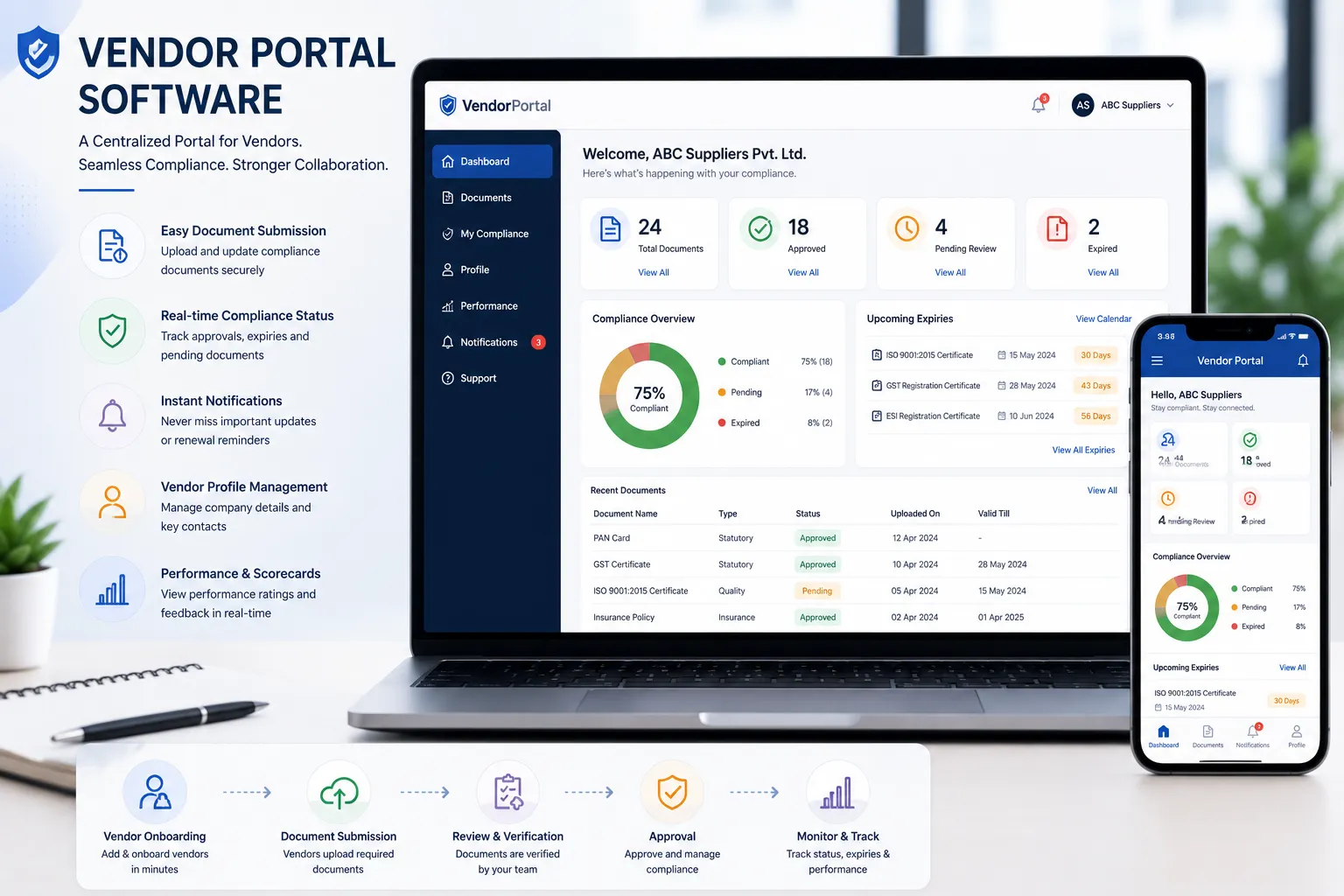
Vendor Portal Software: Complete Guide to Features, Benefits and Buying
Managing suppliers and contractors through email, Excel spreadsheets, shared folders, and paper forms can become difficult as the vendor network grows.
Procurement teams may need to collect company information, request documents, review submissions, follow up on missing records, track approvals, and communicate renewal requirements.
A vendor portal software platform gives vendors and internal teams a structured online workspace for these activities.
A vendor portal can allow suppliers and contractors to:
- Register online
- Submit company information
- Upload required documents
- Respond to document requests
- Update information
- Track submission or approval status
- Receive notifications
- Respond to renewal requests
For procurement and compliance teams, a vendor portal can provide better visibility into vendor onboarding, documentation, approvals, and ongoing compliance activities.
This guide explains what vendor portal software is, the features to look for, the benefits, implementation considerations, and how to evaluate a solution.
What Is Vendor Portal Software?
Vendor portal software is an online platform that allows an organization and its suppliers, contractors, and service providers to exchange vendor information and manage vendor-related workflows.
Depending on the product, a vendor portal may support:
- Vendor self-registration
- Vendor onboarding
- Company-profile management
- Document collection
- Document submission
- Approval workflows
- Compliance tracking
- Expiry reminders
- Renewal requests
- Notifications
- Reporting
- Audit history
The portal acts as a controlled interface between the organization and its vendors.
Instead of asking vendors to repeatedly send documents by email, the organization can provide a structured process for submitting and updating information.
Vendor Portal vs Vendor Self-Service Portal
The terms vendor portal and vendor self-service portal are often used interchangeably.
A vendor portal is generally the broader platform.
A vendor self-service portal emphasizes the actions vendors can perform themselves, such as:
- Registering
- Updating company details
- Uploading documents
- Responding to requests
- Checking submission status
- Providing renewed documents
A good self-service experience can reduce repetitive work for procurement and compliance teams.
For a more focused discussion, see Vendor Self-Service Portal.
Why Companies Need Vendor Portal Software
Organizations often work with:
- Suppliers
- Contractors
- Manpower agencies
- Transport vendors
- Maintenance providers
- Security agencies
- Facility-management companies
- Engineering service providers
As the vendor network grows, manual communication can create problems.
Slow Vendor Onboarding
Procurement teams may need to send multiple emails before receiving all required information.
Missing Documents
Vendors may submit incomplete documentation.
Repeated Follow-Up
Internal teams spend time requesting the same information repeatedly.
Duplicate Information
Different spreadsheets or departments may contain different versions of vendor information.
Poor Visibility
It can be difficult to determine which vendors have completed registration and which are still pending.
Audit Preparation Challenges
Finding submission history, approvals, and current documents can take significant time.
A vendor portal creates a more consistent process for vendor interaction.
Traditional Vendor Management vs Vendor Portal Software
| Traditional Process | Vendor Portal Software |
|---|---|
| Email communication | Structured vendor portal |
| Excel tracking | Centralized vendor records |
| Manual document requests | Digital document requests |
| Email attachments | Online document submission |
| Manual follow-up | Notifications and reminders |
| Paper approvals | Digital workflows |
| Scattered records | Centralized history |
| Difficult reporting | Dashboards and reports |
A portal does not eliminate every manual task, but it can reduce repetitive communication and improve process visibility.
Who Should Use Vendor Portal Software?
Vendor portal software can be useful for organizations managing a growing network of suppliers and contractors.
Common industries include:
| Industry | Typical Use |
|---|---|
| Manufacturing | Supplier and contractor onboarding |
| Logistics | Transport and service-provider management |
| Warehousing | Facility and operational vendors |
| Construction | Contractor and subcontractor documentation |
| Engineering | Supplier and project-service documentation |
| Facility Management | Housekeeping, security, and maintenance vendors |
| Automotive | Supplier and contractor documentation |
| Food Processing | Supplier and service-provider records |
There is no universal vendor count at which a portal becomes necessary. The right time depends on vendor volume, document complexity, number of locations, internal workload, and the need for controlled workflows.
Key Features to Look For
Not every vendor portal has the same capabilities. Before selecting software, evaluate the features that match your process.
1. Vendor Self-Registration
Vendors should be able to enter their information through a structured registration process.
Useful fields may include:
- Legal company name
- Address
- Contact information
- Vendor category
- Products or services
- Tax information
- Registration information
2. Vendor Profile Management
Vendors should be able to update permitted information without requiring procurement teams to manually edit every record.
Organizations should retain appropriate controls over important master-data changes.
3. Document Upload
A vendor portal should allow vendors to upload requested documents securely.
Examples may include:
- GST registration information
- PAN
- MSME/Udyam information where applicable
- Insurance documents
- Labour-related records
- PF and ESIC records where applicable
- Licenses
- Certificates
- Contracts
The exact document requirements should depend on the vendor category and applicable requirements.
4. Configurable Document Requirements
Different vendors may require different documents.
Look for the ability to configure requirements by:
- Vendor type
- Industry
- Location
- Risk
- Work category
- Contract
This prevents every vendor from being forced through the same checklist.
5. Approval Workflows
A vendor portal can route submissions to the appropriate internal users.
Typical statuses include:
Submitted → Under Review → Approved / Rejected → Resubmission
Approval history should be retained where required.
6. Document Expiry Tracking
For documents with validity periods, the system should support:
- Expiry dates
- Upcoming-expiry views
- Renewal status
- Reminder schedules
See Vendor Document Expiry Reminder.
7. Automated Notifications
Notifications can be used for:
- Missing documents
- Pending approvals
- Expiring documents
- Renewal requests
- Rejected submissions
- Other workflow events
Reminder schedules should be configurable rather than fixed for every document.
8. Compliance Dashboard
Internal users should be able to identify:
- Completed vendors
- Pending vendors
- Missing documents
- Expiring documents
- Expired documents
- Pending approvals
- Open compliance issues
A useful dashboard should make it easy to identify what action is required.
9. Audit Trail
Track important activities such as:
- Registration
- Document uploads
- Approvals
- Rejections
- Updates
- Status changes
- User activity
This creates a useful history of vendor interactions.
10. Search and Filtering
As vendor numbers grow, users should be able to search and filter by:
- Vendor
- Category
- Location
- Status
- Document type
- Expiry date
- Compliance status
11. Reports and Exports
Useful reports can include:
- Vendor onboarding status
- Missing documents
- Expiring documents
- Expired documents
- Approval status
- Compliance status
- Renewal activity
Export capabilities can also help with audits and management reviews.
12. Role-Based Access
A portal may involve several user groups:
- Administrators
- Procurement teams
- Compliance teams
- Auditors
- Vendors
Role-based permissions help ensure users can access only the information and actions appropriate to their role.
13. API Integration
Larger organizations may need integration with:
- ERP systems
- Procurement systems
- Finance systems
- HR systems
- Identity providers
- Internal applications
Evaluate integration requirements before selecting a portal.
14. AI and OCR
Modern vendor portals may use AI and OCR to assist with:
- Document classification
- Information extraction
- Date extraction
- Registration-number extraction
- Document validation
- Missing-information detection
AI should assist human reviewers rather than automatically making important compliance decisions.
Vendor Portal Onboarding Workflow
A typical workflow can be:
Step 1: Vendor Invitation
The organization invites the vendor to register.
Step 2: Vendor Registration
The vendor provides company information.
Step 3: Requirement Assignment
The portal displays the documents and information required for that vendor.
Step 4: Document Submission
The vendor uploads the required records.
Step 5: Validation
Documents and information are checked.
Step 6: Internal Review
Procurement or compliance users review the submission.
Step 7: Approval
The vendor is approved, rejected, or asked to provide corrections.
Step 8: Vendor Activation
The approved vendor becomes active according to the organization’s process.
Step 9: Ongoing Updates
The vendor can submit updated information or renewal documents when requested.
Benefits of Vendor Portal Software
Faster Vendor Onboarding
Vendors can submit information directly instead of exchanging multiple emails.
Reduced Administrative Work
Procurement teams spend less time manually collecting and organizing documents.
Better Vendor Experience
Vendors have a clear location for submitting information and responding to requests.
Improved Compliance Visibility
Internal teams can identify missing, pending, and expiring records more easily.
Better Data Quality
Structured forms can reduce incomplete or inconsistent information.
Improved Audit Readiness
Submission history, approval records, and documents can be maintained in one system.
Scalable Vendor Management
A structured portal can support a growing vendor network without requiring the same increase in manual follow-up.
Vendor Portal Software vs Email and Excel
Excel and email are not automatically unsuitable.
For a small vendor population with simple requirements, they may still be practical.
However, organizations with larger or more complex vendor processes may need capabilities such as:
- Vendor self-service
- Configurable requirements
- Automated reminders
- Approval workflows
- Audit trails
- Dashboards
- Centralized document management
The decision should be based on process complexity rather than vendor count alone.
How to Choose Vendor Portal Software
Before purchasing a vendor portal, evaluate the following.
1. Vendor Experience
Can a new vendor understand the registration process without extensive assistance?
2. Document Requirements
Can requirements be configured by vendor category?
3. Workflow
Can the system support the organization’s actual approval process?
4. Compliance Tracking
Can users see missing, expiring, and expired documents?
5. Notifications
Can reminders and notifications be configured?
6. Security
Evaluate:
- Authentication
- Authorization
- Role-based access
- Audit logs
- Data protection
- Backup and recovery
7. Integration
Determine whether the portal needs to connect with ERP, procurement, HR, finance, or other systems.
8. Reporting
Check whether the required reports and exports are available.
9. Scalability
Consider expected growth in:
- Vendors
- Documents
- Users
- Locations
10. Total Cost
Consider:
- Subscription
- Implementation
- Data migration
- Integration
- Support
- User licensing
- Vendor licensing where applicable
Vendor Portal Buying Checklist
Before selecting a solution:
- Vendor self-registration
- Vendor profile management
- Secure document upload
- Configurable document requirements
- Approval workflows
- Expiry tracking
- Automated notifications
- Compliance dashboard
- Audit trail
- Search and filtering
- Reports and exports
- Role-based access
- API integration
- AI/OCR capabilities if required
- Mobile-friendly experience
- Appropriate security controls
Common Vendor Portal Buying Mistakes
Choosing Only on Price
A low subscription price may not compensate for poor vendor adoption or missing functionality.
Ignoring Vendor Experience
If vendors find registration difficult, internal teams may continue doing the work manually.
Using One Checklist for Every Vendor
Different suppliers and contractors may have different requirements.
No Approval Workflow
Collecting documents without a structured review process can create another administrative problem.
No Expiry Tracking
A portal that stores documents but does not help monitor renewals may not solve the underlying compliance problem.
Weak Reporting
Without useful dashboards and reports, management may still have limited visibility.
Ignoring Integration
A portal that cannot exchange relevant data with existing systems may create duplicate work.
Best Practices for Implementing a Vendor Portal
Start With the Vendor Journey
Map the process from invitation through registration, approval, and ongoing updates.
Standardize Requirements
Define document and information requirements by vendor category.
Clean Existing Vendor Data
Identify duplicates, inactive vendors, incomplete records, and outdated documents before migration.
Assign Ownership
Define who handles registration, review, approval, renewal, and escalation.
Pilot First
Start with a manageable vendor group and refine the workflow before expanding.
Measure Adoption
Useful metrics include:
- Vendor registration completion rate
- Average onboarding time
- Missing-document rate
- Approval turnaround time
- Renewal completion rate
- Vendor portal adoption
How Vendor Portal Software Supports Vendor Compliance
A vendor portal becomes more valuable when onboarding connects with ongoing compliance.
The broader lifecycle can be:
Vendor Invitation
↓
Registration
↓
Document Collection
↓
Verification
↓
Approval
↓
Vendor Activation
↓
Expiry Monitoring
↓
Renewal
↓
Periodic Review
↓
Audit Readiness
This prevents the portal from becoming just a document-upload website.
How AI Can Support a Vendor Portal
AI and OCR can reduce manual work during document processing.
Depending on the system, they can:
- Identify document types
- Extract vendor information
- Extract dates
- Extract registration numbers
- Compare documents with expected types
- Flag potential issues
- Reduce manual data entry
Human review remains important for significant compliance, legal, financial, and operational decisions.
How VendorCompliancePro Helps
VendorCompliancePro provides a vendor self-service portal combined with vendor document and compliance management.
Organizations can use it for:
- Vendor registration
- Vendor self-service
- Company-profile management
- Configurable document requirements
- Secure document upload
- AI-powered document validation
- OCR processing
- Approval workflows
- Document expiry tracking
- Automated expiry reminders
- Compliance dashboards
- Audit trails
- Reports and analytics
The workflow connects:
Vendor → Registration → Documents → Verification → Approval → Expiry → Renewal → Compliance Status
VendorCompliancePro can complement an existing ERP or procurement system by focusing on vendor onboarding, document collection, compliance monitoring, expiry tracking, renewal reminders, and audit readiness.
Frequently Asked Questions
What is vendor portal software?
Vendor portal software is an online platform that allows suppliers and contractors to register, submit information, upload documents, respond to requests, and interact with an organization’s procurement or compliance teams.
What is a vendor self-service portal?
A vendor self-service portal allows vendors to perform activities themselves, such as registration, document submission, profile updates, and responding to renewal requests.
What documents can vendors upload?
The documents depend on the organization’s requirements. Common examples may include GST registration, PAN, MSME/Udyam information where applicable, insurance, licences, certificates, labour-related records, and PF/ESIC records where applicable.
Can vendor portals automate onboarding?
Yes. A portal can automate invitations, document requests, notifications, approval workflows, and status tracking.
Can vendors update their own information?
Many self-service portals allow vendors to update permitted information. Organizations should maintain approval controls for important master-data changes.
Does a vendor portal replace an ERP?
Usually not. A vendor portal and ERP often serve different purposes.
An ERP may manage purchasing, finance, inventory, and other core processes, while a vendor portal can focus on vendor interaction, document collection, onboarding, and compliance workflows.
Is vendor portal software suitable for SMEs?
Yes. Suitability depends on vendor volume, document complexity, internal workload, and the need for structured vendor workflows rather than a fixed vendor-count threshold.
Can a vendor portal improve audit readiness?
Yes. Centralized documents, submission history, approvals, and audit trails can make it easier to retrieve evidence during audits and reviews.
Conclusion
Vendor portal software can transform vendor interaction from a collection of emails and spreadsheets into a structured digital workflow.
A strong vendor portal connects:
Vendor Registration → Information Collection → Document Submission → Verification → Approval → Compliance Monitoring → Renewal → Audit Readiness
The most important consideration is not simply whether a portal allows vendors to upload documents.
It should help answer:
Which vendors have completed onboarding, which documents are missing or expiring, what action is required, and who is responsible for it?
For growing manufacturing, logistics, warehousing, engineering, construction, and facility-management organizations, a well-designed vendor portal can reduce administrative effort while improving vendor experience and compliance visibility.
Related Articles
- Vendor Self-Service Portal
- Vendor Onboarding Process
- Vendor Compliance Software India
- Vendor Compliance Checklist India
- Vendor Document Management
- Vendor Document Tracking
- Vendor Document Expiry Reminder
- Vendor Contract Expiry Reminder
- Vendor Master Data Management
- Contractor Compliance Management
- PF and ESIC Vendor Compliance Guide
- Vendor Audit Readiness Checklist