Document Expiry Calculator: Free Tool to Calculate Renewal and Expiry Dates
Keeping track of document expiry dates can become difficult when an organization manages dozens or hundreds of vendors, contractors, suppliers, and service providers.
Important documents may have different issue dates, validity periods, and renewal requirements. When expiry dates are tracked manually, it is easy to miss an upcoming renewal.
A Document Expiry Calculator provides a simple way to calculate when a document will expire and plan the renewal process in advance.
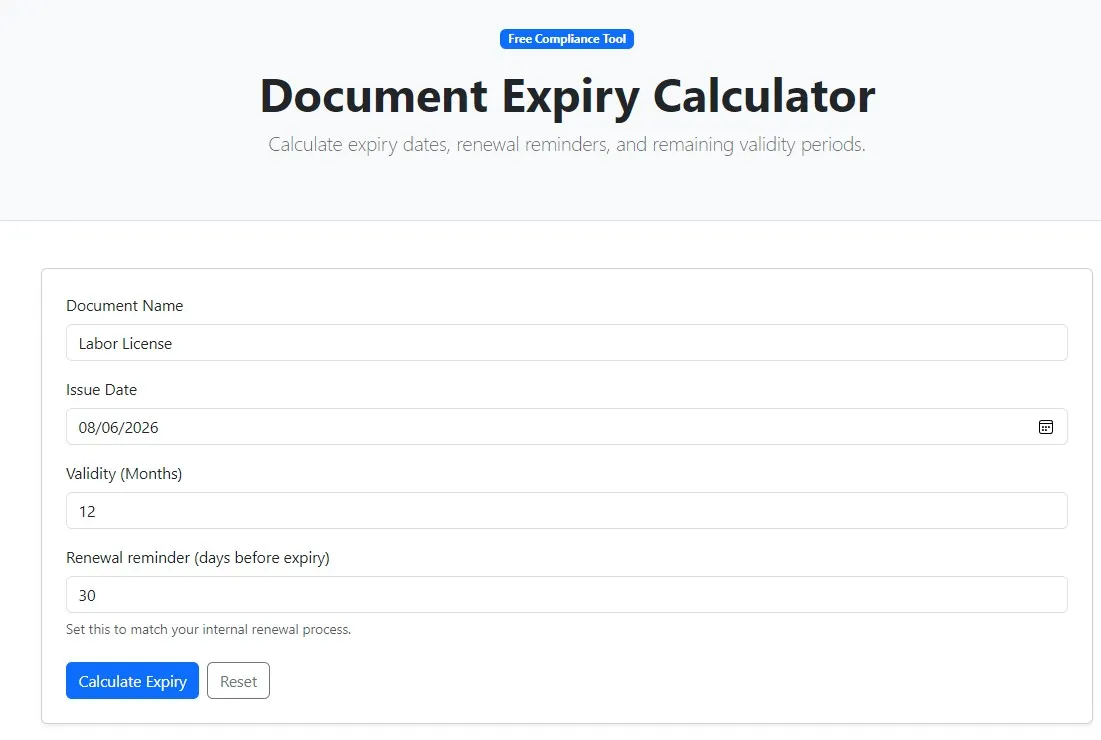
VendorCompliancePro provides a free online Document Expiry Calculator to help procurement, compliance, and vendor management teams quickly calculate document expiry and renewal dates.
Use the Free Document Expiry Calculator →
What Is a Document Expiry Calculator?
A Document Expiry Calculator is a simple tool that helps determine the expiry date of a document based on information such as:
- Issue date
- Validity period
- Expiry date
- Renewal lead time
Instead of calculating dates manually, users can use a calculator to quickly determine when a document will expire and when renewal activity should begin.
The tool is useful for vendor compliance, supplier management, contractor management, document administration, and audit preparation.
Why Document Expiry Dates Matter
Organizations often depend on documents that have limited validity.
Examples may include:
- Insurance certificates
- Labour licences
- Contractor licences
- Factory-related licences
- Pollution control documents
- Safety certificates
- Quality certifications
- Contracts and agreements
If an important document expires without renewal, it may create a compliance gap or operational issue.
Tracking expiry dates in advance gives teams time to request updated documents and complete the necessary review process.
What Documents Can Have Expiry Dates?
The exact requirements depend on the document, vendor, industry, location, and applicable rules.
Common examples include:
Insurance Documents
- Workmen compensation policies
- Public liability insurance
- Other vendor insurance certificates
Licences and Permits
- Labour licences
- Contractor licences
- Factory-related licences
- Operational permits
Certifications
- Quality certifications
- Safety certifications
- Industry-specific certificates
Contracts and Agreements
- Service agreements
- Maintenance contracts
- Vendor contracts
- Annual maintenance agreements
Not every vendor document has an expiry date. Some registrations may remain valid unless changed, cancelled, or otherwise subject to a renewal requirement.
How a Document Expiry Calculator Works
A basic expiry calculation can follow a simple process.
Step 1: Enter the Document Date
Provide the relevant issue or start date.
Step 2: Enter the Validity Period
Enter the applicable validity period, such as a number of days, months, or years, depending on the document and the calculator.
Step 3: Calculate the Expiry Date
The calculator determines the resulting date based on the information entered.
Step 4: Plan the Renewal
Use the expiry date to decide when renewal activity should begin.
Calculate a Document Expiry Date →
The calculated date should always be checked against the actual document and the applicable issuing authority or contractual requirement.
Why Manual Expiry Calculations Can Cause Problems
Teams sometimes calculate dates using:
- Excel formulas
- Calendar calculations
- Paper records
- Manual notes
- Email reminders
These methods can work for a small number of documents, but errors become more likely as the number of documents increases.
Common problems include:
Incorrect Dates
A manual calculation may use the wrong validity period or starting date.
Missed Renewal Planning
Knowing the expiry date is useful, but teams also need sufficient time to complete renewal activities.
Spreadsheet Errors
Incorrect formulas or manually entered dates can create inaccurate results.
Scattered Records
The calculated date may not be linked to the actual document or vendor record.
No Central Visibility
Teams may know individual expiry dates but still lack an overview of upcoming renewals.
Expiry Date vs Renewal Date
These two dates should not be confused.
Expiry Date
The expiry date indicates when the current document’s validity ends, subject to the terms applicable to that document.
Renewal Date
A renewal activity date is the date by which your organization plans to start or complete the renewal process.
For example, if a document expires on a particular date, an organization may decide to begin renewal several weeks or months earlier.
The appropriate lead time depends on the document and the renewal process.
Why Renewal Lead Time Matters
Calculating the expiry date is only the first step.
Organizations should also consider how long renewal may take.
A renewal process may involve:
- Requesting the updated document
- Waiting for the vendor
- Reviewing the document
- Correcting missing information
- Obtaining internal approval
- Updating the vendor record
Starting too close to the expiry date can create unnecessary pressure.
Document Expiry Tracking Example
Consider a contractor whose insurance document has a defined validity period.
The compliance team can:
Record document date
↓
Calculate expiry date
↓
Set renewal lead time
↓
Send renewal request
↓
Receive updated document
↓
Review and approve
↓
Update vendor record
This creates a repeatable process instead of relying on last-minute follow-up.
Document Expiry Tracking Checklist
For every document with an expiry date, consider recording:
| Information | Purpose |
|---|---|
| Vendor Name | Identify the vendor |
| Document Type | Identify the record |
| Issue Date | Establish the document start date |
| Expiry Date | Identify the validity end date |
| Renewal Lead Time | Plan renewal activity |
| Document Status | Track current state |
| Owner | Assign responsibility |
| Updated Document | Maintain the latest record |
This structure can make document expiry management easier to maintain.
Common Document Expiry Statuses
Organizations can use simple statuses such as:
- Valid
- Expiring Soon
- Renewal In Progress
- Expired
- Pending Review
- Missing
Clear status categories help teams prioritize follow-up activities.
Manual Tracking vs Automated Expiry Tracking
| Manual Tracking | Automated Tracking |
|---|---|
| Excel spreadsheets | Centralized repository |
| Manual date calculations | Automated date tracking |
| Calendar reminders | Automated notifications |
| Email follow-ups | Vendor self-service |
| Scattered documents | Organized records |
| Manual reports | Compliance dashboards |
A calculator helps with the date calculation. A document management or vendor compliance system can help with the ongoing tracking and follow-up.
Benefits of Using a Document Expiry Calculator
Faster Date Calculation
Calculate expiry dates without performing the calculation manually.
Better Renewal Planning
Use the calculated date to plan renewal activity.
Fewer Manual Errors
A dedicated calculator can reduce simple date-calculation mistakes.
Easy to Use
A calculator can be useful when you need a quick answer without maintaining a spreadsheet.
Useful for Vendor Management
Procurement and compliance teams can use expiry calculations when reviewing vendor records.
Document Expiry Calculator for Vendor Compliance
Vendor compliance teams often manage large numbers of documents.
For example, a manufacturing company may have suppliers and contractors with:
- Insurance documents
- Labour licences
- Contractor licences
- Safety certificates
- Quality certificates
- Service agreements
Each document may have a different validity period.
A document expiry calculator provides a quick way to calculate individual expiry dates while reviewing or onboarding vendor documents.
Document Expiry Calculator for Contractors
Contractor management often involves recurring document submissions.
Depending on the contractor and scope of work, organizations may need to track:
- Insurance
- Licences
- Safety documentation
- Certifications
- Statutory records
- Contracts
Calculating expiry dates helps teams identify when updated records may be required.
Requirements should always be determined based on the contractor’s actual activities and applicable obligations.
How the Free Document Expiry Calculator Helps
The free Document Expiry Calculator from VendorCompliancePro provides a quick way to calculate document expiry dates.
You can use it when:
- Reviewing a vendor document
- Onboarding a contractor
- Checking an insurance certificate
- Planning a renewal
- Updating a compliance spreadsheet
- Preparing vendor records for an audit
Use the Free Document Expiry Calculator →
The tool is intended for date calculation and planning. The actual validity of a document should always be confirmed from the document itself and the applicable issuing authority, contract, or regulatory requirement.
Best Practices for Managing Document Expiry
Centralize Documents
Keep the document and its expiry information together.
Record Accurate Dates
Use the date shown on the actual document.
Define Renewal Lead Times
Start renewal activities early enough to allow for vendor response and review.
Review Expiring Documents Regularly
Identify documents approaching expiry before they become problems.
Automate Reminders
Use automated notifications where the volume of documents makes manual tracking difficult.
Keep Historical Records
Maintain previous versions when appropriate for audit and compliance purposes.
Common Mistakes When Tracking Document Expiry
Using the Wrong Start Date
Always verify which date the document uses for validity.
Assuming Every Document Has an Expiry Date
Some documents do not have a fixed expiry date or may be subject to different validity conditions.
Ignoring Renewal Processing Time
Renewal may require vendor submission, review, and approval.
Tracking Only the Expiry Date
A useful process should also track ownership, status, and renewal activity.
Relying Entirely on Manual Reminders
Manual reminders can become difficult to maintain as the number of vendors increases.
How VendorCompliancePro Helps
VendorCompliancePro helps organizations manage vendor documents and compliance activities through:
- Centralized document repository
- Vendor self-service portal
- Automated expiry reminders
- Compliance dashboards
- Approval workflows
- AI-powered document validation
- Audit trails
- Reports and analytics
A calculator can help determine an individual expiry date, while VendorCompliancePro helps organizations manage document validity across the vendor lifecycle.
Frequently Asked Questions
What is a Document Expiry Calculator?
A Document Expiry Calculator is a tool that helps calculate when a document will expire based on its relevant date and validity period.
Why should I calculate document expiry dates?
Calculating expiry dates helps organizations plan renewals and reduce the risk of overlooking important document deadlines.
Which documents can be tracked for expiry?
Depending on the organization, documents such as insurance certificates, licences, permits, certifications, contracts, and other time-bound records may require expiry tracking.
Is an expiry date the same as a renewal date?
No. The expiry date indicates when the current validity ends, while a renewal date or renewal-start date is an internal planning date used to begin the renewal process.
Can Excel calculate document expiry dates?
Yes. Excel can calculate dates using formulas, but a dedicated calculator can be more convenient for quick individual calculations.
Should every vendor document have an expiry date?
No. Some documents do not have a fixed expiry date. The applicable validity requirements should be confirmed for each document.
Is the Document Expiry Calculator free?
Yes. VendorCompliancePro provides the Document Expiry Calculator as a free online tool.
Conclusion
Document expiry tracking is an important part of vendor compliance and document management.
A Document Expiry Calculator provides a quick and convenient way to calculate expiry dates and plan renewal activities. It is especially useful when reviewing vendor, supplier, contractor, insurance, licence, certification, and contract records.
For organizations managing many vendors and documents, calculating individual dates is only the first step. A structured compliance process with centralized records, automated reminders, and clear ownership can provide much better ongoing visibility.
Use the free Document Expiry Calculator to calculate your next document expiry date.
Try the Free Document Expiry Calculator →